

构建检索增强生成(RAG)应用:第一部分
由 LLM 支持的最强大应用之一是复杂的问答(Q&A)聊天机器人。这些应用可以回答关于特定来源信息的问题。这些应用使用一种称为检索增强生成(Retrieval Augmented Generation)的技术,或者 RAG。
这是一个多部分教程:
本教程将展示如何构建一个简单的、基于文本数据源的问答应用程序。在此过程中,我们将介绍典型的问答架构,并提供更多高级问答技巧的相关资源。我们还将了解 LangSmith 如何帮助我们跟踪和理解我们的应用程序。随着应用程序复杂度的增加,LangSmith 将变得越来越有用。
如果你已经熟悉了基本的检索技术,你可能还会对这份 不同检索技术的高级概述 感兴趣。
注意:这里我们专注于非结构化数据的问答。如果你对结构化数据的 RAG 感兴趣,请查看我们关于对 SQL 数据进行问答 的教程。
概述
一个典型的 RAG 应用包含两个主要组件:
索引 (Indexing):一个处理数据从源头摄取并进行索引的管道。这通常是离线进行的。
检索和生成 (Retrieval and generation):实际的 RAG 链,它在运行时接收用户查询,从索引中检索相关数据,然后将其传递给模型。
注意:本教程的索引部分将很大程度上遵循 语义搜索教程。
从原始数据到答案的最常见的完整流程如下:
索引 (Indexing)
- 加载 (Load):首先我们需要加载我们的数据。这可以通过 文档加载器 (Document Loaders) 来完成。
- 分割 (Split):文本分割器 (Text splitters) 将大型
Documents分割成更小的块(chunks)。这对于索引数据和将其传递给模型都很有用,因为大块数据更难搜索,并且可能无法适应模型有限的上下文窗口。 - 存储 (Store):我们需要一个地方来存储和索引我们的分割数据,以便稍后可以对其进行搜索。这通常使用 向量存储 (VectorStore) 和 嵌入模型 (Embeddings) 来完成。
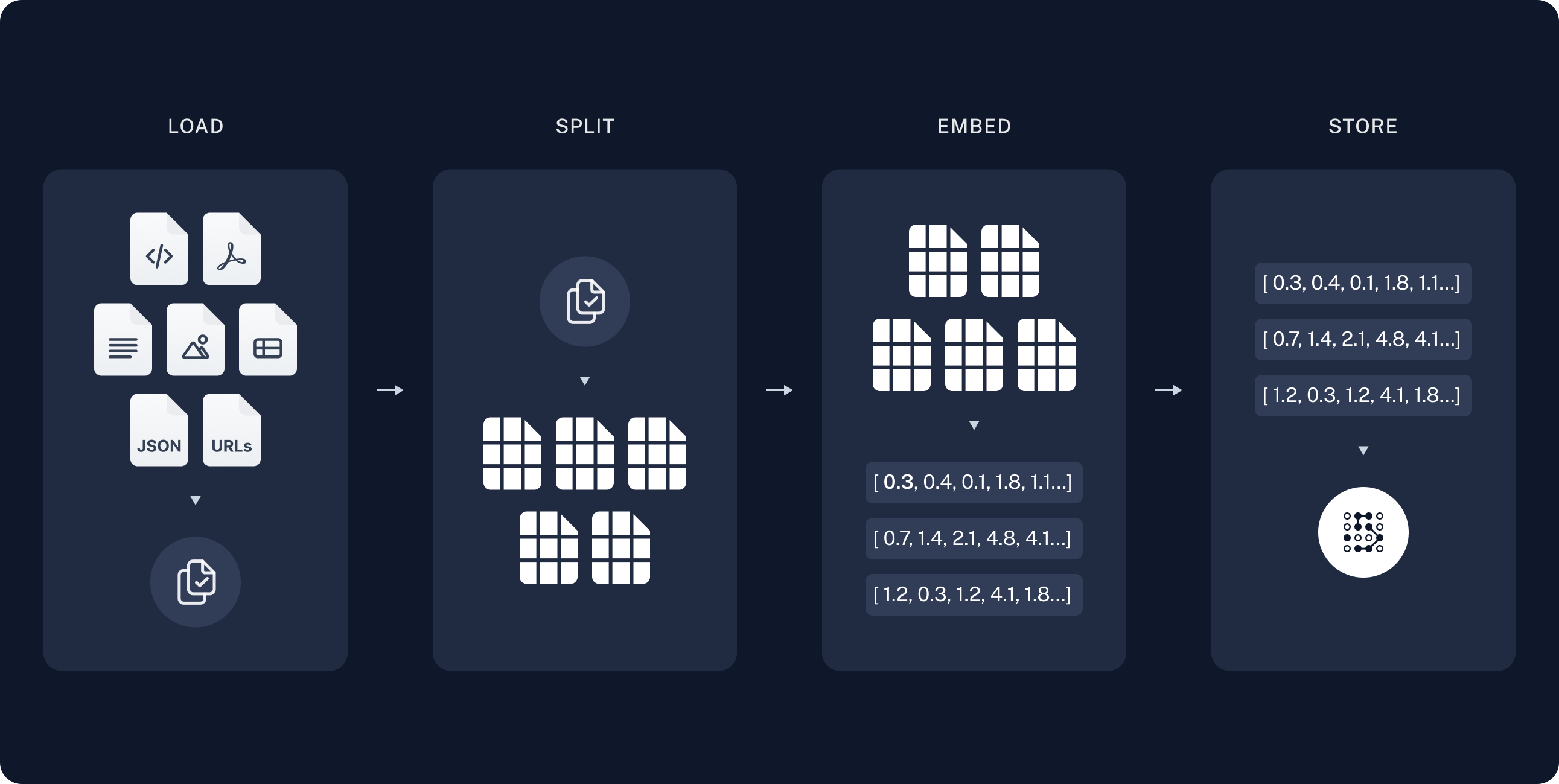
检索和生成 (Retrieval and generation)
- 检索 (Retrieve):给定用户输入,使用 检索器 (Retriever) 从存储中检索相关的分割数据。
- 生成 (Generate):聊天模型 (ChatModel) / LLM (LLM) 使用一个包含问题和检索数据的提示来生成答案。
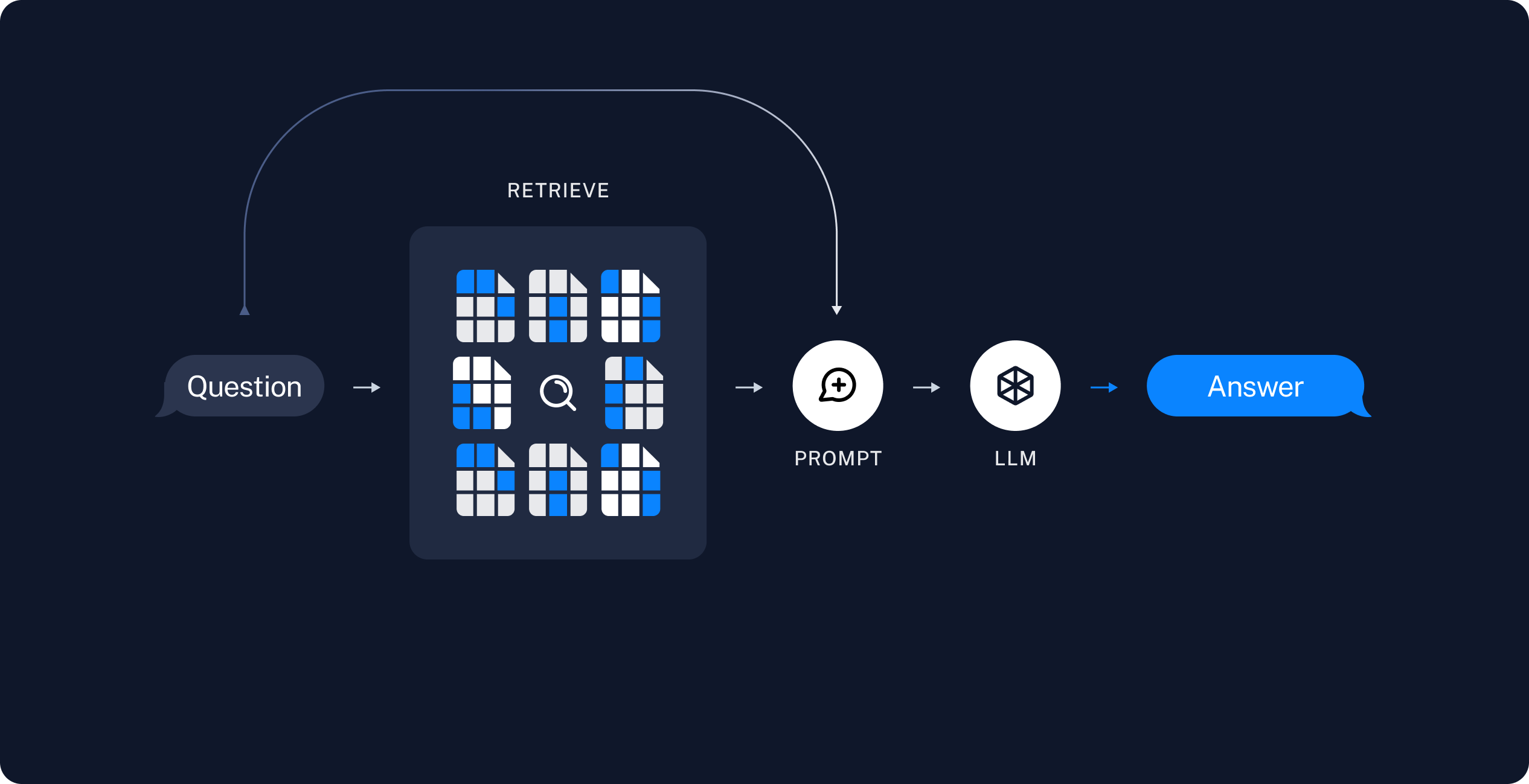
在索引了我们的数据之后,我们将使用 LangGraph 作为我们的编排框架来实现检索和生成步骤。
设置 (Setup)
Jupyter Notebook
本教程及其他教程通过 Jupyter notebooks 来运行可能最方便。在交互式环境中学习指南是更好地理解它们的绝佳方式。请参阅 此处 获取安装说明。
安装 (Installation)
本教程需要以下 langchain 依赖项:
- Pip
- Conda
%pip install --quiet --upgrade langchain-text-splitters langchain-community langgraph
conda install langchain-text-splitters langchain-community langgraph -c conda-forge
有关更多详细信息,请参阅我们的安装指南。
LangSmith
您使用 LangChain 构建的许多应用程序将包含多个步骤,并且会多次调用 LLM。 随着这些应用程序变得越来越复杂,能够检查链或代理内部的确切情况变得至关重要。 做到这一点最好的方法是使用 LangSmith。
在上面的链接注册后,请确保设置您的环境变量以开始记录跟踪:
export LANGSMITH_TRACING="true"
export LANGSMITH_API_KEY="..."
或者,如果在笔记本电脑中,您可以使用以下方法设置它们:
import getpass
import os

os.environ["LANGSMITH_TRACING"] = "true"
os.environ["LANGSMITH_API_KEY"] = getpass.getpass()
Components
我们将需要从 LangChain 的集成套件中选择三个组件。
pip install -qU "langchain[google-genai]"
import getpass
import os

if not os.environ.get("GOOGLE_API_KEY"):
  os.environ["GOOGLE_API_KEY"] = getpass.getpass("Enter API key for Google Gemini: ")

from langchain.chat_models import init_chat_model

llm = init_chat_model("gemini-2.0-flash", model_provider="google_genai")
pip install -qU langchain-openai
import getpass
import os

if not os.environ.get("OPENAI_API_KEY"):
  os.environ["OPENAI_API_KEY"] = getpass.getpass("Enter API key for OpenAI: ")

from langchain_openai import OpenAIEmbeddings

embeddings = OpenAIEmbeddings(model="text-embedding-3-large")
pip install -qU langchain-core
from langchain_core.vectorstores import InMemoryVectorStore

vector_store = InMemoryVectorStore(embeddings)
预览
在本指南中,我们将构建一个应用程序,用于回答有关网站内容的问题。我们将使用的具体网站是 Lilian Weng 的博客文章 LLM 驱动的自主代理,它允许我们询问有关文章内容的问题。
我们可以创建一个简单的索引管道和 RAG 链来完成此操作,代码大约为 50 行。
import bs4
from langchain import hub
from langchain_community.document_loaders import WebBaseLoader
from langchain_core.documents import Document
from langchain_text_splitters import RecursiveCharacterTextSplitter
from langgraph.graph import START, StateGraph
from typing_extensions import List, TypedDict

# 加载并分块博客内容
loader = WebBaseLoader(
    web_paths=("https://lilianweng.github.io/posts/2023-06-23-agent/",),
    bs_kwargs=dict(
        parse_only=bs4.SoupStrainer(
            class_=("post-content", "post-title", "post-header")
        )
    ),
)
docs = loader.load()

text_splitter = RecursiveCharacterTextSplitter(chunk_size=1000, chunk_overlap=200)
all_splits = text_splitter.split_documents(docs)

# 索引块
_ = vector_store.add_documents(documents=all_splits)

# 定义用于问答的提示
# 注意:对于非美国 LangSmith 端点,您可能需要在 hub.pull 中指定
# api_url="https://api.smith.langchain.com"。
prompt = hub.pull("rlm/rag-prompt")


# 定义应用程序状态
class State(TypedDict):
    question: str
    context: List[Document]
    answer: str


# 定义应用程序步骤
def retrieve(state: State):
    retrieved_docs = vector_store.similarity_search(state["question"])
    return {"context": retrieved_docs}


def generate(state: State):
    docs_content = "\n\n".join(doc.page_content for doc in state["context"])
    messages = prompt.invoke({"question": state["question"], "context": docs_content})
    response = llm.invoke(messages)
    return {"answer": response.content}


# 编译应用程序并进行测试
graph_builder = StateGraph(State).add_sequence([retrieve, generate])
graph_builder.add_edge(START, "retrieve")
graph = graph_builder.compile()
response = graph.invoke({"question": "什么是任务分解?"})
print(response["answer"])
任务分解是将复杂的任务分解成更小、更易于管理的步骤的过程,以方便执行和理解。像思维链 (CoT) 和思维树 (ToT) 这样的技术可以指导模型进行分步思考,使它们能够探索多种推理可能性。这种方法提高了模型处理复杂任务的性能,并提供了对其思考过程的洞察。
请查看 LangSmith 追踪记录。
详细 walkthrough
让我们一步一步地分析上面的代码,以真正理解正在发生的事情。
1. 索引
加载文档
我们首先需要加载博客文章的内容。我们可以使用 DocumentLoaders 来实现这一点,它们是将数据从源加载并返回 Document 对象列表的对象。
在本例中,我们将使用
WebBaseLoader,
它使用 urllib 从 Web URL 加载 HTML,并使用 BeautifulSoup 将其解析为文本。我们可以通过将参数传递给 BeautifulSoup 解析器(通过 bs_kwargs)来自定义 HTML -> 文本解析(请参阅
BeautifulSoup
文档)。
在此示例中,只有类为“post-content”、“post-title”或“post-header”的 HTML 标签是相关的,因此我们将删除所有其他标签。
import bs4
from langchain_community.document_loaders import WebBaseLoader

# Only keep post title, headers, and content from the full HTML.
bs4_strainer = bs4.SoupStrainer(class_=("post-title", "post-header", "post-content"))
loader = WebBaseLoader(
    web_paths=("https://lilianweng.github.io/posts/2023-06-23-agent/",),
    bs_kwargs={"parse_only": bs4_strainer},
)
docs = loader.load()

assert len(docs) == 1
print(f"Total characters: {len(docs[0].page_content)}")
Total characters: 43131
print(docs[0].page_content[:500])
      LLM Powered Autonomous Agents

Date: June 23, 2023  |  Estimated Reading Time: 31 min  |  Author: Lilian Weng


Building agents with LLM (large language model) as its core controller is a cool concept. Several proof-of-concepts demos, such as AutoGPT, GPT-Engineer and BabyAGI, serve as inspiring examples. The potentiality of LLM extends beyond generating well-written copies, stories, essays and programs; it can be framed as a powerful general problem solver.
Agent System Overview#
In
深入了解
DocumentLoader: 从源加载数据并将其作为 Documents 列表的对象。
分割文档
我们加载的文档超过 42k 个字符,对于许多模型的上下文窗口来说太长了。即使是那些可以适应整个帖子的模型的上下文窗口的模型,也很难在非常长的输入中找到信息。
为了解决这个问题,我们将 Document 分割成块,用于嵌入和向量存储。这应该有助于我们在运行时只检索博客文章中最相关的部分。
正如在语义搜索教程中所说,我们使用了一个 RecursiveCharacterTextSplitter, 它将递归地使用换行符等常见分隔符分割文档,直到每个块的大小合适为止。这是 推荐的文本分割器,适用于通用文本用例。
from langchain_text_splitters import RecursiveCharacterTextSplitter

text_splitter = RecursiveCharacterTextSplitter(
    chunk_size=1000,  # chunk size (characters)
    chunk_overlap=200,  # chunk overlap (characters)
    add_start_index=True,  # track index in original document
)
all_splits = text_splitter.split_documents(docs)

print(f"Split blog post into {len(all_splits)} sub-documents.")
Split blog post into 66 sub-documents.
深入了解
TextSplitter: 将 Document 对象列表分割成更小块的对象。是 DocumentTransformer 的子类。
- 通过阅读操作指南文档,了解使用不同方法分割文本的更多信息
- 代码 (py 或 js)
- 科学论文
- 接口:基础接口的 API 参考。
DocumentTransformer: 对 Document 对象列表执行转换的对象。
存储文档
现在我们需要索引我们分成的 66 个文本块,以便在运行时搜索它们。遵循语义搜索教程,我们的方法是嵌入每个文档块的内容,并将这些嵌入插入到向量存储中。给定一个输入查询,我们就可以使用向量搜索来检索相关文档。
我们可以使用教程开始时选择的向量存储和嵌入模型,通过一个命令嵌入和存储我们所有的文档块。
document_ids = vector_store.add_documents(documents=all_splits)

print(document_ids[:3])
['07c18af6-ad58-479a-bfb1-d508033f9c64', '9000bf8e-1993-446f-8d4d-f4e507ba4b8f', 'ba3b5d14-bed9-4f5f-88be-44c88aedc2e6']
深入探索
Embeddings: 一个文本嵌入模型的包装器,用于将文本转换为嵌入向量。
VectorStore: 一个向量数据库的包装器,用于存储和查询嵌入向量。
这标志着流水线中 索引 部分的完成。此时,我们有了一个可查询的向量存储,其中包含我们博客文章的分块内容。给定用户的问题,我们理想情况下应该能够返回回答该问题的博客文章片段。
2. 检索与生成
现在让我们来编写实际的应用程序逻辑。我们想创建一个简单的应用程序,该应用程序获取用户问题,搜索与该问题相关的文档,将检索到的文档和初始问题传递给模型,并返回答案。
对于生成部分,我们将使用在教程开始时选择的聊天模型。
我们将使用一个针对 RAG(检索增强生成)的提示词,该提示词已录入 LangChain 提示词中心(在此处)。
from langchain import hub

# N.B. for non-US LangSmith endpoints, you may need to specify
# api_url="https://api.smith.langchain.com" in hub.pull.
prompt = hub.pull("rlm/rag-prompt")

example_messages = prompt.invoke(
    {"context": "(context goes here)", "question": "(question goes here)"}
).to_messages()

assert len(example_messages) == 1
print(example_messages[0].content)
You are an assistant for question-answering tasks. Use the following pieces of retrieved context to answer the question. If you don't know the answer, just say that you don't know. Use three sentences maximum and keep the answer concise.
Question: (question goes here)
Context: (context goes here)
Answer:
我们将使用 LangGraph 将检索和生成步骤整合到一个应用程序中。这将带来诸多好处:
- 我们可以定义一次应用程序逻辑,并自动支持多种调用模式,包括流式、异步和批量调用。
- 通过 LangGraph Platform 实现精简的部署。
- LangSmith 将自动追踪我们应用程序的各个步骤。
- 我们可以轻松地为应用程序添加关键功能,包括持久化和人工审批,只需少量代码更改。
要使用 LangGraph,我们需要定义三样东西:
- 应用程序的状态;
- 应用程序的节点(即应用程序的步骤);
- 应用程序的“控制流”(例如,步骤的顺序)。
状态:
应用程序的状态控制着输入应用程序的数据、在步骤之间传输的数据以及由应用程序输出的数据。它通常是 TypedDict,但也可以是 Pydantic BaseModel。
对于一个简单的 RAG 应用程序,我们可以只跟踪输入的问题、检索到的上下文和生成的答案:
from langchain_core.documents import Document
from typing_extensions import List, TypedDict


class State(TypedDict):
    question: str
    context: List[Document]
    answer: str
节点(应用程序步骤)
让我们从一个简单的两步序列开始:检索和生成。
def retrieve(state: State):
    retrieved_docs = vector_store.similarity_search(state["question"])
    return {"context": retrieved_docs}


def generate(state: State):
    docs_content = "\n\n".join(doc.page_content for doc in state["context"])
    messages = prompt.invoke({"question": state["question"], "context": docs_content})
    response = llm.invoke(messages)
    return {"answer": response.content}
我们的检索步骤仅使用输入问题运行相似性搜索,生成步骤将检索到的上下文和原始问题格式化为聊天模型的提示。
控制流
最后,我们将应用程序编译成一个单一的 graph 对象。在这种情况下,我们只是将检索和生成步骤连接成一个单一的序列。
from langgraph.graph import START, StateGraph

graph_builder = StateGraph(State).add_sequence([retrieve, generate])
graph_builder.add_edge(START, "retrieve")
graph = graph_builder.compile()
LangGraph 还内置了用于可视化应用程序控制流的实用程序:
from IPython.display import Image, display

display(Image(graph.get_graph().draw_mermaid_png()))

我需要使用 LangGraph 吗?
构建 RAG 应用并不需要 LangGraph。事实上,我们可以通过调用单个组件来实现相同的应用逻辑:
question = "..."

retrieved_docs = vector_store.similarity_search(question)
docs_content = "\n\n".join(doc.page_content for doc in retrieved_docs)
prompt = prompt.invoke({"question": question, "context": docs_content})
answer = llm.invoke(prompt)
LangGraph 的优势包括:
- 支持多种调用模式:如果我们想流式传输输出 token,或者流式传输单个步骤的结果,就需要重写此逻辑;
- 通过 LangSmith 自动支持跟踪,通过 LangGraph Platform 支持部署;
- 支持持久化、人工干预和其他功能。
许多用例要求 RAG 以对话方式进行,以便用户能够通过有状态的对话获得信息丰富的答案。正如我们在教程的 第二部分 中将看到的,LangGraph 的状态管理和持久化极大地简化了这些应用。
用法
让我们测试我们的应用程序!LangGraph 支持多种调用模式,包括同步、异步和流式调用。
调用:
result = graph.invoke({"question": "What is Task Decomposition?"})

print(f'Context: {result["context"]}\n\n')
print(f'Answer: {result["answer"]}')
Context: [Document(id='a42dc78b-8f76-472a-9e25-180508af74f3', metadata={'source': 'https://lilianweng.github.io/posts/2023-06-23-agent/', 'start_index': 1585}, page_content='Fig. 1. Overview of a LLM-powered autonomous agent system.\nComponent One: Planning#\nA complicated task usually involves many steps. An agent needs to know what they are and plan ahead.\nTask Decomposition#\nChain of thought (CoT; Wei et al. 2022) has become a standard prompting technique for enhancing model performance on complex tasks. The model is instructed to “think step by step” to utilize more test-time computation to decompose hard tasks into smaller and simpler steps. CoT transforms big tasks into multiple manageable tasks and shed lights into an interpretation of the model’s thinking process.'), Document(id='c0e45887-d0b0-483d-821a-bb5d8316d51d', metadata={'source': 'https://lilianweng.github.io/posts/2023-06-23-agent/', 'start_index': 2192}, page_content='Tree of Thoughts (Yao et al. 2023) extends CoT by exploring multiple reasoning possibilities at each step. It first decomposes the problem into multiple thought steps and generates multiple thoughts per step, creating a tree structure. The search process can be BFS (breadth-first search) or DFS (depth-first search) with each state evaluated by a classifier (via a prompt) or majority vote.\nTask decomposition can be done (1) by LLM with simple prompting like "Steps for XYZ.\\n1.", "What are the subgoals for achieving XYZ?", (2) by using task-specific instructions; e.g. "Write a story outline." for writing a novel, or (3) with human inputs.'), Document(id='4cc7f318-35f5-440f-a4a4-145b5f0b918d', metadata={'source': 'https://lilianweng.github.io/posts/2023-06-23-agent/', 'start_index': 29630}, page_content='Resources:\n1. Internet access for searches and information gathering.\n2. Long Term memory management.\n3. GPT-3.5 powered Agents for delegation of simple tasks.\n4. File output.\n\nPerformance Evaluation:\n1. Continuously review and analyze your actions to ensure you are performing to the best of your abilities.\n2. Constructively self-criticize your big-picture behavior constantly.\n3. Reflect on past decisions and strategies to refine your approach.\n4. Every command has a cost, so be smart and efficient. Aim to complete tasks in the least number of steps.'), Document(id='f621ade4-9b0d-471f-a522-44eb5feeba0c', metadata={'source': 'https://lilianweng.github.io/posts/2023-06-23-agent/', 'start_index': 19373}, page_content="(3) Task execution: Expert models execute on the specific tasks and log results.\nInstruction:\n\nWith the input and the inference results, the AI assistant needs to describe the process and results. The previous stages can be formed as - User Input: {{ User Input }}, Task Planning: {{ Tasks }}, Model Selection: {{ Model Assignment }}, Task Execution: {{ Predictions }}. You must first answer the user's request in a straightforward manner. Then describe the task process and show your analysis and model inference results to the user in the first person. If inference results contain a file path, must tell the user the complete file path.")]


Answer: Task decomposition is a technique used to break down complex tasks into smaller, manageable steps, allowing for more efficient problem-solving. This can be achieved through methods like chain of thought prompting or the tree of thoughts approach, which explores multiple reasoning possibilities at each step. It can be initiated through simple prompts, task-specific instructions, or human inputs.
流式传输步骤:
for step in graph.stream(
    {"question": "What is Task Decomposition?"}, stream_mode="updates"
):
    print(f"{step}\n\n----------------\n")
{'retrieve': {'context': [Document(id='a42dc78b-8f76-472a-9e25-180508af74f3', metadata={'source': 'https://lilianweng.github.io/posts/2023-06-23-agent/', 'start_index': 1585}, page_content='Fig. 1. Overview of a LLM-powered autonomous agent system.\nComponent One: Planning#\nA complicated task usually involves many steps. An agent needs to know what they are and plan ahead.\nTask Decomposition#\nChain of thought (CoT; Wei et al. 2022) has become a standard prompting technique for enhancing model performance on complex tasks. The model is instructed to “think step by step” to utilize more test-time computation to decompose hard tasks into smaller and simpler steps. CoT transforms big tasks into multiple manageable tasks and shed lights into an interpretation of the model’s thinking process.'), Document(id='c0e45887-d0b0-483d-821a-bb5d8316d51d', metadata={'source': 'https://lilianweng.github.io/posts/2023-06-23-agent/', 'start_index': 2192}, page_content='Tree of Thoughts (Yao et al. 2023) extends CoT by exploring multiple reasoning possibilities at each step. It first decomposes the problem into multiple thought steps and generates multiple thoughts per step, creating a tree structure. The search process can be BFS (breadth-first search) or DFS (depth-first search) with each state evaluated by a classifier (via a prompt) or majority vote.\nTask decomposition can be done (1) by LLM with simple prompting like "Steps for XYZ.\\n1.", "What are the subgoals for achieving XYZ?", (2) by using task-specific instructions; e.g. "Write a story outline." for writing a novel, or (3) with human inputs.'), Document(id='4cc7f318-35f5-440f-a4a4-145b5f0b918d', metadata={'source': 'https://lilianweng.github.io/posts/2023-06-23-agent/', 'start_index': 29630}, page_content='Resources:\n1. Internet access for searches and information gathering.\n2. Long Term memory management.\n3. GPT-3.5 powered Agents for delegation of simple tasks.\n4. File output.\n\nPerformance Evaluation:\n1. Continuously review and analyze your actions to ensure you are performing to the best of your abilities.\n2. Constructively self-criticize your big-picture behavior constantly.\n3. Reflect on past decisions and strategies to refine your approach.\n4. Every command has a cost, so be smart and efficient. Aim to complete tasks in the least number of steps.'), Document(id='f621ade4-9b0d-471f-a522-44eb5feeba0c', metadata={'source': 'https://lilianweng.github.io/posts/2023-06-23-agent/', 'start_index': 19373}, page_content="(3) Task execution: Expert models execute on the specific tasks and log results.\nInstruction:\n\nWith the input and the inference results, the AI assistant needs to describe the process and results. The previous stages can be formed as - User Input: {{ User Input }}, Task Planning: {{ Tasks }}, Model Selection: {{ Model Assignment }}, Task Execution: {{ Predictions }}. You must first answer the user's request in a straightforward manner. Then describe the task process and show your analysis and model inference results to the user in the first person. If inference results contain a file path, must tell the user the complete file path.")]}}

----------------

{'generate': {'answer': 'Task decomposition is the process of breaking down a complex task into smaller, more manageable steps. This technique, often enhanced by methods like Chain of Thought (CoT) or Tree of Thoughts, allows models to reason through tasks systematically and improves performance by clarifying the thought process. It can be achieved through simple prompts, task-specific instructions, or human inputs.'}}

----------------
Stream tokens:
for message, metadata in graph.stream(
    {"question": "What is Task Decomposition?"}, stream_mode="messages"
):
    print(message.content, end="|")
|Task| decomposition| is| the| process| of| breaking| down| complex| tasks| into| smaller|,| more| manageable| steps|.| It| can| be| achieved| through| techniques| like| Chain| of| Thought| (|Co|T|)| prompting|,| which| encourages| the| model| to| think| step| by| step|,| or| through| more| structured| methods| like| the| Tree| of| Thoughts|.| This| approach| not| only| simplifies| task| execution| but| also| provides| insights| into| the| model|'s| reasoning| process|.||
对于异步调用,请使用:
result = await graph.ainvoke(...)
和
async for step in graph.astream(...):
返回来源
请注意,通过将检索到的上下文存储在图的状态中,我们可以恢复模型在状态的“上下文”字段中生成的答案的来源。有关返回来源的更多详细信息,请参阅本指南。
深入了解
聊天模型接收一系列消息并返回一条消息。
自定义提示
如上所示,我们可以从提示中心加载提示(例如,此 RAG 提示)。也可以轻松自定义提示。例如:
from langchain_core.prompts import PromptTemplate

template = """Use the following pieces of context to answer the question at the end.
If you don't know the answer, just say that you don't know, don't try to make up an answer.
Use three sentences maximum and keep the answer as concise as possible.
Always say "thanks for asking!" at the end of the answer.

{context}

Question: {question}

Helpful Answer:"""
custom_rag_prompt = PromptTemplate.from_template(template)
查询分析
到目前为止,我们使用原始输入查询来执行检索。然而,允许模型为检索目的生成查询具有一些优势。例如:
- 除了语义搜索,我们还可以加入结构化过滤器(例如,“查找 2020 年以来的文档”);
- 模型可以重写用户可能的多方面或包含无关语言的查询,使其成为更有效的搜索查询。
查询分析 使用模型根据原始用户输入转换或构建优化的搜索查询。我们可以轻松地将查询分析步骤集成到我们的应用程序中。为了说明起见,让我们为向量商店中的文档添加一些元数据。我们将为文档添加一些(人为设置的)部分,以便稍后进行过滤。
total_documents = len(all_splits)
third = total_documents // 3

for i, document in enumerate(all_splits):
    if i < third:
        document.metadata["section"] = "beginning"
    elif i < 2 * third:
        document.metadata["section"] = "middle"
    else:
        document.metadata["section"] = "end"


all_splits[0].metadata
{'source': 'https://lilianweng.github.io/posts/2023-06-23-agent/',
 'start_index': 8,
 'section': 'beginning'}
我们需要更新矢量存储中的文档。我们将为此使用一个简单的 InMemoryVectorStore,因为我们将使用它的一些特定功能(即元数据过滤)。有关您选择的矢量存储的相关功能,请参阅矢量存储 集成文档。
from langchain_core.vectorstores import InMemoryVectorStore

vector_store = InMemoryVectorStore(embeddings)
_ = vector_store.add_documents(all_splits)
接下来,我们为搜索查询定义一个模式。我们将为此目的使用 结构化输出。在此,我们将查询定义为包含一个字符串查询和一个文档部分(“beginning”、“middle” 或 “end”),但您可以根据自己的喜好来定义。
from typing import Literal

from typing_extensions import Annotated


class Search(TypedDict):
    """Search query."""

    query: Annotated[str, ..., "Search query to run."]
    section: Annotated[
        Literal["beginning", "middle", "end"],
        ...,
        "Section to query.",
    ]
最后,我们在 LangGraph 应用程序中添加一个步骤,以根据用户的原始输入生成查询:
class State(TypedDict):
    question: str
    query: Search
    context: List[Document]
    answer: str


def analyze_query(state: State):
    structured_llm = llm.with_structured_output(Search)
    query = structured_llm.invoke(state["question"])
    return {"query": query}


def retrieve(state: State):
    query = state["query"]
    retrieved_docs = vector_store.similarity_search(
        query["query"],
        filter=lambda doc: doc.metadata.get("section") == query["section"],
    )
    return {"context": retrieved_docs}


def generate(state: State):
    docs_content = "\n\n".join(doc.page_content for doc in state["context"])
    messages = prompt.invoke({"question": state["question"], "context": docs_content})
    response = llm.invoke(messages)
    return {"answer": response.content}


graph_builder = StateGraph(State).add_sequence([analyze_query, retrieve, generate])
graph_builder.add_edge(START, "analyze_query")
graph = graph_builder.compile()
完整代码:
from typing import Literal

import bs4
from langchain import hub
from langchain_community.document_loaders import WebBaseLoader
from langchain_core.documents import Document
from langchain_core.vectorstores import InMemoryVectorStore
from langchain_text_splitters import RecursiveCharacterTextSplitter
from langgraph.graph import START, StateGraph
from typing_extensions import Annotated, List, TypedDict

# 加载并分块博客内容
loader = WebBaseLoader(
    web_paths=("https://lilianweng.github.io/posts/2023-06-23-agent/",),
    bs_kwargs=dict(
        parse_only=bs4.SoupStrainer(
            class_=("post-content", "post-title", "post-header")
        )
    ),
)
docs = loader.load()

text_splitter = RecursiveCharacterTextSplitter(chunk_size=1000, chunk_overlap=200)
all_splits = text_splitter.split_documents(docs)


# 更新元数据(用于说明目的)
total_documents = len(all_splits)
third = total_documents // 3

for i, document in enumerate(all_splits):
    if i < third:
        document.metadata["section"] = "beginning"
    elif i < 2 * third:
        document.metadata["section"] = "middle"
    else:
        document.metadata["section"] = "end"


# 索引块
vector_store = InMemoryVectorStore(embeddings)
_ = vector_store.add_documents(all_splits)


# 定义搜索逻辑图的状态
class Search(TypedDict):
    """搜索查询。"""

    query: Annotated[str, ..., "要运行的搜索查询。"]
    section: Annotated[
        Literal["beginning", "middle", "end"],
        ...,
        "要查询的部分。",
    ]

# 定义用于问答的提示符
prompt = hub.pull("rlm/rag-prompt")


# 定义应用程序的状态
class State(TypedDict):
    question: str
    query: Search
    context: List[Document]
    answer: str


def analyze_query(state: State):
    structured_llm = llm.with_structured_output(Search)
    query = structured_llm.invoke(state["question"])
    return {"query": query}


def retrieve(state: State):
    query = state["query"]
    retrieved_docs = vector_store.similarity_search(
        query["query"],
        filter=lambda doc: doc.metadata.get("section") == query["section"],
    )
    return {"context": retrieved_docs}


def generate(state: State):
    docs_content = "\n\n".join(doc.page_content for doc in state["context"])
    messages = prompt.invoke({"question": state["question"], "context": docs_content})
    response = llm.invoke(messages)
    return {"answer": response.content}


graph_builder = StateGraph(State).add_sequence([analyze_query, retrieve, generate])
graph_builder.add_edge(START, "analyze_query")
graph = graph_builder.compile()
display(Image(graph.get_graph().draw_mermaid_png()))

我们可以通过具体询问文章末尾的上下文来测试我们的实现。请注意,模型在其答案中包含了不同的信息。
for step in graph.stream(
    {"question": "What does the end of the post say about Task Decomposition?"},
    stream_mode="updates",
):
    print(f"{step}\n\n----------------\n")
{'analyze_query': {'query': {'query': 'Task Decomposition', 'section': 'end'}}}

----------------

{'retrieve': {'context': [Document(id='d6cef137-e1e8-4ddc-91dc-b62bd33c6020', metadata={'source': 'https://lilianweng.github.io/posts/2023-06-23-agent/', 'start_index': 39221, 'section': 'end'}, page_content='Finite context length: The restricted context capacity limits the inclusion of historical information, detailed instructions, API call context, and responses. The design of the system has to work with this limited communication bandwidth, while mechanisms like self-reflection to learn from past mistakes would benefit a lot from long or infinite context windows. Although vector stores and retrieval can provide access to a larger knowledge pool, their representation power is not as powerful as full attention.\n\n\nChallenges in long-term planning and task decomposition: Planning over a lengthy history and effectively exploring the solution space remain challenging. LLMs struggle to adjust plans when faced with unexpected errors, making them less robust compared to humans who learn from trial and error.'), Document(id='d1834ae1-eb6a-43d7-a023-08dfa5028799', metadata={'source': 'https://lilianweng.github.io/posts/2023-06-23-agent/', 'start_index': 39086, 'section': 'end'}, page_content='}\n]\nChallenges#\nAfter going through key ideas and demos of building LLM-centered agents, I start to see a couple common limitations:'), Document(id='ca7f06e4-2c2e-4788-9a81-2418d82213d9', metadata={'source': 'https://lilianweng.github.io/posts/2023-06-23-agent/', 'start_index': 32942, 'section': 'end'}, page_content='}\n]\nThen after these clarification, the agent moved into the code writing mode with a different system message.\nSystem message:'), Document(id='1fcc2736-30f4-4ef6-90f2-c64af92118cb', metadata={'source': 'https://lilianweng.github.io/posts/2023-06-23-agent/', 'start_index': 35127, 'section': 'end'}, page_content='"content": "You will get instructions for code to write.\\nYou will write a very long answer. Make sure that every detail of the architecture is, in the end, implemented as code.\\nMake sure that every detail of the architecture is, in the end, implemented as code.\\n\\nThink step by step and reason yourself to the right decisions to make sure we get it right.\\nYou will first lay out the names of the core classes, functions, methods that will be necessary, as well as a quick comment on their purpose.\\n\\nThen you will output the content of each file including ALL code.\\nEach file must strictly follow a markdown code block format, where the following tokens must be replaced such that\\nFILENAME is the lowercase file name including the file extension,\\nLANG is the markup code block language for the code\'s language, and CODE is the code:\\n\\nFILENAME\\n\`\`\`LANG\\nCODE\\n\`\`\`\\n\\nYou will start with the \\"entrypoint\\" file, then go to the ones that are imported by that file, and so on.\\nPlease')]}}

----------------

{'generate': {'answer': 'The end of the post highlights that task decomposition faces challenges in long-term planning and adapting to unexpected errors. LLMs struggle with adjusting their plans, making them less robust compared to humans who learn from trial and error. This indicates a limitation in effectively exploring the solution space and handling complex tasks.'}}

----------------
在流式处理步骤和 LangSmith trace 中,我们现在可以看到被馈送到检索步骤的结构化查询。
查询分析是一个复杂的问题,有多种解决方法。有关更多示例,请参阅操作指南。
后续步骤
我们已经介绍了构建一个基于数据的基础问答应用程序的步骤:
- 使用 Document Loader 加载数据
- 使用 Text Splitter 对索引化数据进行分块,以便模型更容易使用
- Embedding 数据并将其存储在 vectorstore 中
- 根据传入的问题 检索 先前存储的块
- 利用检索到的块作为上下文生成答案。
在教程的 第二部分 中,我们将扩展此处实现的应用程序,以适应对话式交互和多步检索过程。
延伸阅读: