

记录、追踪和监控
在使用 Langchain 构建应用或代理时,您需要发出多个 API 调用来满足单个用户请求。但是,当您想分析这些请求时,它们并不是按顺序链接的。有了 Portkey,来自单个用户请求的所有 embeddings、completions 和其他请求都将被记录并追踪到共同的 ID,使您能够完全了解用户互动情况。
本 Notebook 将逐步指导您如何在 Langchain 应用中使用 Portkey 来记录、追踪和监控 Langchain LLM 调用。
首先,我们导入 Portkey、OpenAI 和 Agent 工具
import os

from langchain.agents import AgentExecutor, create_openai_tools_agent
from langchain_openai import ChatOpenAI
from portkey_ai import PORTKEY_GATEWAY_URL, createHeaders
在此处粘贴您的 OpenAI API 密钥。(您可以在此处找到它)
os.environ["OPENAI_API_KEY"] = "..."
获取 Portkey API 密钥
PORTKEY_API_KEY = "..." # Paste your Portkey API Key here
设置 Trace ID
- 在下方设置您请求的 Trace ID
- Trace ID 可供源自单个请求的所有 API 调用共用
TRACE_ID = "uuid-trace-id" # Set trace id here
生成 Portkey 头
This page explains how to generate Portkey
portkey_headers = createHeaders(
    api_key=PORTKEY_API_KEY, provider="openai", trace_id=TRACE_ID
)
定义提示词和要使用的工具
from langchain import hub
from langchain_core.tools import tool

prompt = hub.pull("hwchase17/openai-tools-agent")


@tool
def multiply(first_int: int, second_int: int) -> int:
    """Multiply two integers together."""
    return first_int * second_int


@tool
def exponentiate(base: int, exponent: int) -> int:
    "Exponentiate the base to the exponent power."
    return base**exponent


tools = [multiply, exponentiate]
像往常一样运行您的代理。唯一的更改是,我们现在将在请求中包含上述标头。
model = ChatOpenAI(
    base_url=PORTKEY_GATEWAY_URL, default_headers=portkey_headers, temperature=0
)

# Construct the OpenAI Tools agent
agent = create_openai_tools_agent(model, tools, prompt)

# Create an agent executor by passing in the agent and tools
agent_executor = AgentExecutor(agent=agent, tools=tools, verbose=True)

agent_executor.invoke(
    {
        "input": "Take 3 to the fifth power and multiply that by thirty six, then square the result"
    }
)
[1m> Entering new AgentExecutor chain...[0m
[32;1m[1;3m
Invoking: `exponentiate` with `{'base': 3, 'exponent': 5}`
[0m[33;1m[1;3m243[0m[32;1m[1;3m
Invoking: `multiply` with `{'first_int': 243, 'second_int': 36}`
[0m[36;1m[1;3m8748[0m[32;1m[1;3m
Invoking: `exponentiate` with `{'base': 8748, 'exponent': 2}`
[0m[33;1m[1;3m76527504[0m[32;1m[1;3mThe result of taking 3 to the fifth power, multiplying it by 36, and then squaring the result is 76,527,504.[0m
[1m> Finished chain.[0m
{'input': 'Take 3 to the fifth power and multiply that by thirty six, then square the result',
 'output': 'The result of taking 3 to the fifth power, multiplying it by 36, and then squaring the result is 76,527,504.'}
数据记录与追踪详解 - Portkey
数据记录 (Logging)
- 通过 Portkey 发送请求可确保所有请求默认都已记录。
- 每个请求日志包含
timestamp(时间戳)、model name(模型名称)、total cost(总成本)、request time(请求时间)、request json(请求 JSON)、response json(响应 JSON)以及额外的 Portkey 功能。
Trace id会伴随每个请求传递,并可在 Portkey 控制板的日志中看到。- 您也可以为每个请求设置一个独立的
trace id。 - 您还可以向
trace id追加用户反馈。更多信息请参见此链接。
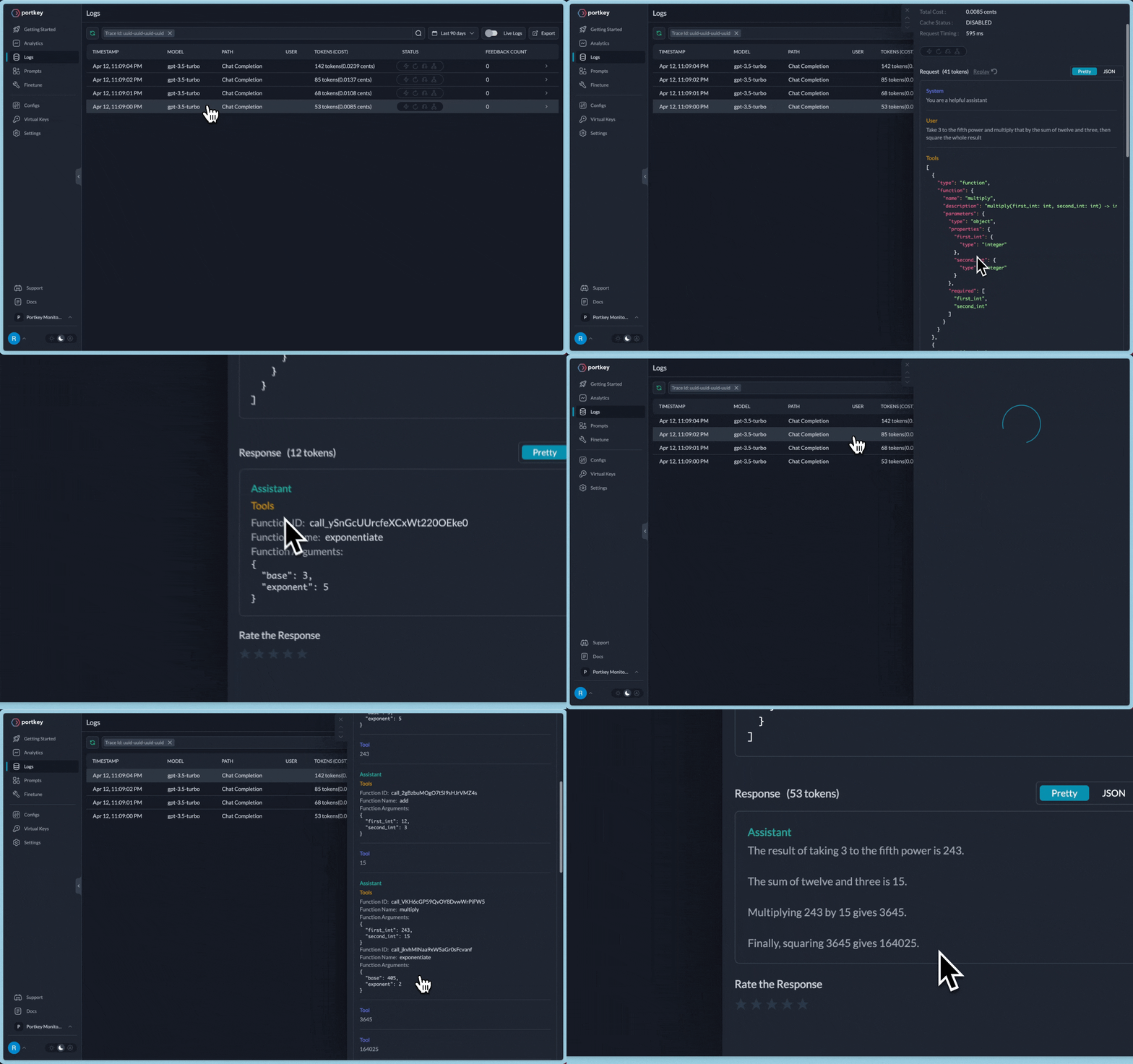
对于上述请求,您将能够像这样查看完整的日志追踪信息:
高级 LLMOps 功能 - 缓存、标记、重试
除了日志记录和跟踪,Portkey 还提供更多将生产级能力添加到现有工作流程的功能:
缓存
从缓存响应之前已服务的客户查询,而不是再次发送到 OpenAI。匹配完全相同的字符串或语义相似的字符串。缓存可以节省成本并降低 20 倍的延迟。文档
重试
自动重新处理任何不成功的 API 请求,最多 5 次。采用 指数退避 策略,拉开重试尝试的间隔,以防止网络过载。文档
标记
通过预定义的标记,详细跟踪和审计每次用户交互。文档