

如何为 LLM 和聊天模型添加临时工具调用功能
一些模型已经针对工具调用进行了微调,并提供了专门的工具调用 API。通常,这类模型比未进行微调的模型在工具调用方面表现更好,建议用于需要工具调用的用例。有关更多信息,请参阅如何使用聊天模型调用工具指南。
本指南假设您熟悉以下概念:
在本指南中,我们将了解如何为聊天模型添加临时工具调用支持。如果您使用的模型不原生支持工具调用,则可以使用此方法来调用工具。
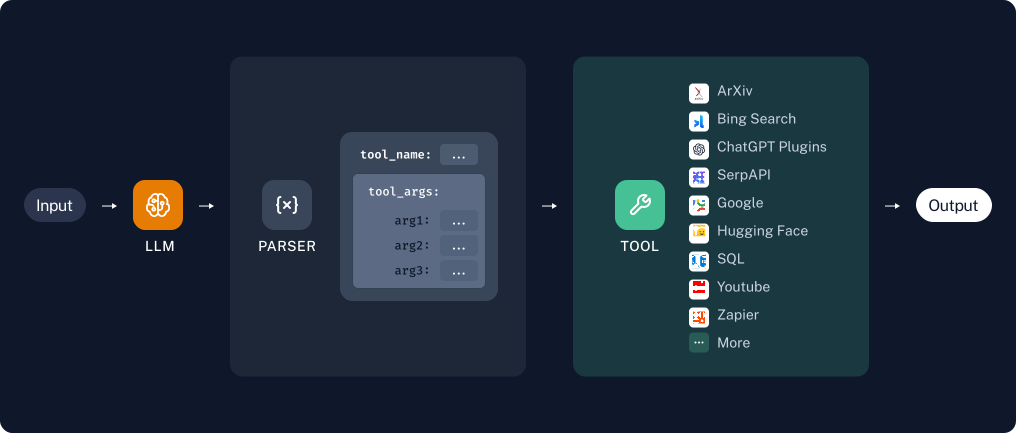
我们将通过编写一个提示来实现这一点,该提示将让模型调用适当的工具。这是逻辑图:
设置
我们需要安装以下包:
%pip install --upgrade --quiet langchain langchain-community
如果你想使用 LangSmith,请取消下面的注释:
import getpass
import os
# os.environ["LANGSMITH_TRACING"] = "true"
# os.environ["LANGSMITH_API_KEY"] = getpass.getpass()
您可以为本操作指南选择任何提供的模型。请注意,其中大多数模型已支持原生工具调用,因此使用此处所示的提示策略对这些模型没有意义,您应该遵循如何使用聊天模型调用工具指南。
pip install -qU "langchain[google-genai]"
import getpass
import os

if not os.environ.get("GOOGLE_API_KEY"):
  os.environ["GOOGLE_API_KEY"] = getpass.getpass("Enter API key for Google Gemini: ")

from langchain.chat_models import init_chat_model

model = init_chat_model("gemini-2.0-flash", model_provider="google_genai")
为了说明这个想法,我们将通过 Ollama 使用 phi3,它不支持原生工具调用。如果您也想使用 Ollama,请遵循这些说明。
from langchain_community.llms import Ollama

model = Ollama(model="phi3")
要创建工具,您需要有一个包含 name 和 description 键的 JSON 对象。
以下是创建 add 和 multiply 工具的示例:
[
  {
    "name": "add",
    "description": "Adds two numbers together."
  },
  {
    "name": "multiply",
    "description": "Multiplies two numbers


```python
from langchain_core.tools import tool


@tool
def multiply(x: float, y: float) -> float:
    """Multiply two numbers together."""
    return x * y


@tool
def add(x: int, y: int) -> int:
    "Add two numbers."
    return x + y


tools = [multiply, add]

# Let's inspect the tools
for t in tools:
    print("--")
    print(t.name)
    print(t.description)
    print(t.args)
--
multiply
Multiply two numbers together.
{'x': {'title': 'X', 'type': 'number'}, 'y': {'title': 'Y', 'type': 'number'}}
--
add
Add two numbers.
{'x': {'title': 'X', 'type': 'integer'}, 'y': {'title': 'Y', 'type': 'integer'}}
multiply.invoke({"x": 4, "y": 5})
20.0
创建我们的提示词
我们将编写一个提示词,用于指定模型可以使用的工具、这些工具的参数以及模型所需的输出格式。在本例中,我们将指示模型输出一个 JSON 块,其格式为 {"name": "...", "arguments": {...}}。
from langchain_core.output_parsers import JsonOutputParser
from langchain_core.prompts import ChatPromptTemplate
from langchain_core.tools import render_text_description

rendered_tools = render_text_description(tools)
print(rendered_tools)
multiply(x: float, y: float) -> float - Multiply two numbers together.
add(x: int, y: int) -> int - Add two numbers.
system_prompt = f"""\
You are an assistant that has access to the following set of tools.
Here are the names and descriptions for each tool:

{rendered_tools}

Given the user input, return the name and input of the tool to use.
Return your response as a JSON blob with 'name' and 'arguments' keys.

The `arguments` should be a dictionary, with keys corresponding
to the argument names and the values corresponding to the requested values.
"""

prompt = ChatPromptTemplate.from_messages(
    [("system", system_prompt), ("user", "{input}")]
)
chain = prompt | model
message = chain.invoke({"input": "what's 3 plus 1132"})

# Let's take a look at the output from the model
# if the model is an LLM (not a chat model), the output will be a string.
if isinstance(message, str):
    print(message)
else:  # Otherwise it's a chat model
    print(message.content)
{
    "name": "add",
    "arguments": {
        "x": 3,
        "y": 1132
    }
}
添加输出解析器
我们将使用 JsonOutputParser 来将模型的输出解析为 JSON。
from langchain_core.output_parsers import JsonOutputParser

chain = prompt | model | JsonOutputParser()
chain.invoke({"input": "what's thirteen times 4"})
{'name': 'multiply', 'arguments': {'x': 13.0, 'y': 4.0}}
🎉 太棒了!🎉 我们现在已经指导模型如何请求调用工具了。
现在,让我们来创建一些实际运行工具的逻辑!
调用工具 🏃
模型现在可以请求调用工具了,接下来我们需要编写一个函数来实际调用该工具。
该函数将根据名称选择合适的工具,并将模型选择的参数传递给它。
from typing import Any, Dict, Optional, TypedDict

from langchain_core.runnables import RunnableConfig


class ToolCallRequest(TypedDict):
    """A typed dict that shows the inputs into the invoke_tool function."""

    name: str
    arguments: Dict[str, Any]


def invoke_tool(
    tool_call_request: ToolCallRequest, config: Optional[RunnableConfig] = None
):
    """A function that we can use the perform a tool invocation.

    Args:
        tool_call_request: a dict that contains the keys name and arguments.
            The name must match the name of a tool that exists.
            The arguments are the arguments to that tool.
        config: This is configuration information that LangChain uses that contains
            things like callbacks, metadata, etc.See LCEL documentation about RunnableConfig.

    Returns:
        output from the requested tool
    """
    tool_name_to_tool = {tool.name: tool for tool in tools}
    name = tool_call_request["name"]
    requested_tool = tool_name_to_tool[name]
    return requested_tool.invoke(tool_call_request["arguments"], config=config)
让我们来试试这个 🧪!
invoke_tool({"name": "multiply", "arguments": {"x": 3, "y": 5}})
15.0
整合起来
让我们将它们整合起来,创建一个既能进行加法又能进行乘法的计算器。
chain = prompt | model | JsonOutputParser() | invoke_tool
chain.invoke({"input": "what's thirteen times 4.14137281"})
53.83784653
返回工具输入
不仅返回工具输出,还能返回工具输入也是很有帮助的。我们可以通过使RunnablePassthrough.assign工具输出来轻松实现这一点。这将采用RunnablePassrthrough组件的输入(假定为一个字典),并在其中添加一个键,同时仍然传递输入中当前的所有内容:
from langchain_core.runnables import RunnablePassthrough

chain = (
    prompt | model | JsonOutputParser() | RunnablePassthrough.assign(output=invoke_tool)
)
chain.invoke({"input": "what's thirteen times 4.14137281"})
{'name': 'multiply',
 'arguments': {'x': 13, 'y': 4.14137281},
 'output': 53.83784653}
接下来的步骤
本操作指南展示了模型正确输出所有必需工具信息的“理想路径”。
实际上,如果您使用更复杂的工具,您将开始遇到模型输出的错误,特别是对于未经微调以支持工具调用且能力较低的模型。
您需要准备好添加策略来改进模型的输出;例如:
- 提供少样本示例。
- 添加错误处理(例如,捕获异常并将其反馈给 LLM,要求它纠正之前的输出)。