

如何实现“自查询”检索
前往 Integrations 查看对内置支持自查询的向量存储的文档。
自查询检索器顾名思义,它能够查询自身。具体来说,给定任何自然语言查询,检索器会使用一个查询构建 LLM 链来编写结构化查询,然后将该结构化查询应用于其底层的向量存储。这使得检索器不仅可以使用用户输入的查询与存储文档的内容进行语义相似性比较,还可以从用户查询中提取关于存储文档元数据的过滤器并执行这些过滤器。
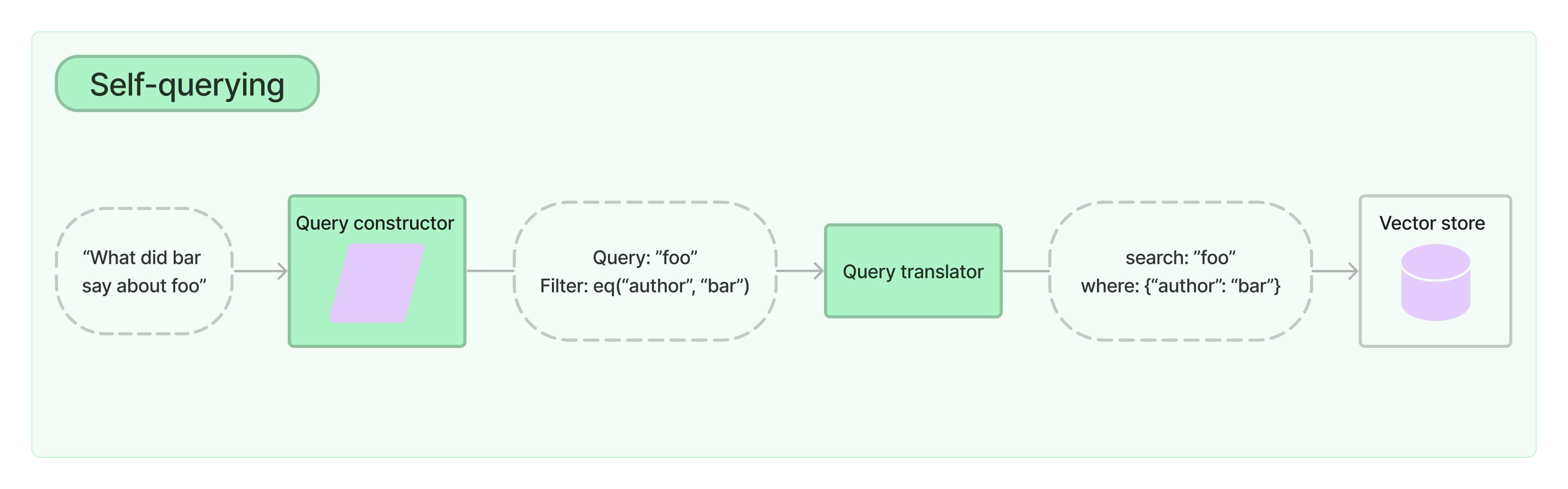
入门
为了演示,我们将使用 Chroma 向量存储。我们创建了一组包含电影摘要的小型演示文档。
注意: 自查询检索器需要您安装 lark 包。
%pip install --upgrade --quiet lark langchain-chroma
from langchain_chroma import Chroma
from langchain_core.documents import Document
from langchain_openai import OpenAIEmbeddings

docs = [
    Document(
        page_content="A bunch of scientists bring back dinosaurs and mayhem breaks loose",
        metadata={"year": 1993, "rating": 7.7, "genre": "science fiction"},
    ),
    Document(
        page_content="Leo DiCaprio gets lost in a dream within a dream within a dream within a ...",
        metadata={"year": 2010, "director": "Christopher Nolan", "rating": 8.2},
    ),
    Document(
        page_content="A psychologist / detective gets lost in a series of dreams within dreams within dreams and Inception reused the idea",
        metadata={"year": 2006, "director": "Satoshi Kon", "rating": 8.6},
    ),
    Document(
        page_content="A bunch of normal-sized women are supremely wholesome and some men pine after them",
        metadata={"year": 2019, "director": "Greta Gerwig", "rating": 8.3},
    ),
    Document(
        page_content="Toys come alive and have a blast doing so",
        metadata={"year": 1995, "genre": "animated"},
    ),
    Document(
        page_content="Three men walk into the Zone, three men walk out of the Zone",
        metadata={
            "year": 1979,
            "director": "Andrei Tarkovsky",
            "genre": "thriller",
            "rating": 9.9,
        },
    ),
]
vectorstore = Chroma.from_documents(docs, OpenAIEmbeddings())
创建我们的自查询检索器
现在我们可以实例化我们的检索器。要做到这一点,我们需要预先提供一些关于我们的文档支持的元数据字段以及文档内容的简短描述。
from langchain.chains.query_constructor.schema import AttributeInfo
from langchain.retrievers.self_query.base import SelfQueryRetriever
from langchain_openai import ChatOpenAI

metadata_field_info = [
    AttributeInfo(
        name="genre",
        description="The genre of the movie. One of ['science fiction', 'comedy', 'drama', 'thriller', 'romance', 'action', 'animated']",
        type="string",
    ),
    AttributeInfo(
        name="year",
        description="The year the movie was released",
        type="integer",
    ),
    AttributeInfo(
        name="director",
        description="The name of the movie director",
        type="string",
    ),
    AttributeInfo(
        name="rating", description="A 1-10 rating for the movie", type="float"
    ),
]
document_content_description = "Brief summary of a movie"
llm = ChatOpenAI(temperature=0)
retriever = SelfQueryRetriever.from_llm(
    llm,
    vectorstore,
    document_content_description,
    metadata_field_info,
)
测试一下
现在我们就可以实际尝试使用我们的检索器了!
# This example only specifies a filter
retriever.invoke("I want to watch a movie rated higher than 8.5")
[Document(page_content='Three men walk into the Zone, three men walk out of the Zone', metadata={'director': 'Andrei Tarkovsky', 'genre': 'thriller', 'rating': 9.9, 'year': 1979}),
 Document(page_content='A psychologist / detective gets lost in a series of dreams within dreams within dreams and Inception reused the idea', metadata={'director': 'Satoshi Kon', 'rating': 8.6, 'year': 2006})]
# This example specifies a query and a filter
retriever.invoke("Has Greta Gerwig directed any movies about women")
[Document(page_content='A bunch of normal-sized women are supremely wholesome and some men pine after them', metadata={'director': 'Greta Gerwig', 'rating': 8.3, 'year': 2019})]
# This example specifies a composite filter
retriever.invoke("What's a highly rated (above 8.5) science fiction film?")
[Document(page_content='A psychologist / detective gets lost in a series of dreams within dreams within dreams and Inception reused the idea', metadata={'director': 'Satoshi Kon', 'rating': 8.6, 'year': 2006}),
 Document(page_content='Three men walk into the Zone, three men walk out of the Zone', metadata={'director': 'Andrei Tarkovsky', 'genre': 'thriller', 'rating': 9.9, 'year': 1979})]
# This example specifies a query and composite filter
retriever.invoke(
    "What's a movie after 1990 but before 2005 that's all about toys, and preferably is animated"
)
[Document(page_content='Toys come alive and have a blast doing so', metadata={'genre': 'animated', 'year': 1995})]
过滤 k
我们也可以使用 self query retriever 来指定 k:要获取的文档数量。
我们可以通过将 enable_limit=True 传递给构造函数来实现此目的。
retriever = SelfQueryRetriever.from_llm(
    llm,
    vectorstore,
    document_content_description,
    metadata_field_info,
    enable_limit=True,
)

# This example only specifies a relevant query
retriever.invoke("What are two movies about dinosaurs")
[Document(page_content='A bunch of scientists bring back dinosaurs and mayhem breaks loose', metadata={'genre': 'science fiction', 'rating': 7.7, 'year': 1993}),
 Document(page_content='Toys come alive and have a blast doing so', metadata={'genre': 'animated', 'year': 1995})]
使用 LCEL 从零开始构建
为了了解底层的工作原理,并获得更自定义的控制,我们可以从零开始重建检索器。
首先,我们需要创建一个查询构建链。此链将接收用户查询并生成一个 StructuredQuery 对象,该对象捕获用户指定的过滤器。我们提供了一些用于创建提示和输出解析器的辅助函数。这些函数具有许多可调参数,为简单起见,我们此处将忽略它们。
from langchain.chains.query_constructor.base import (
    StructuredQueryOutputParser,
    get_query_constructor_prompt,
)

prompt = get_query_constructor_prompt(
    document_content_description,
    metadata_field_info,
)
output_parser = StructuredQueryOutputParser.from_components()
query_constructor = prompt | llm | output_parser
让我们来看看我们的提示:
print(prompt.format(query="dummy question"))
Your goal is to structure the user's query to match the request schema provided below.

<< Structured Request Schema >>
When responding use a markdown code snippet with a JSON object formatted in the following schema:

\`\`\`json
{
    "query": string \ text string to compare to document contents
    "filter": string \ logical condition statement for filtering documents
}
\`\`\`

The query string should contain only text that is expected to match the contents of documents. Any conditions in the filter should not be mentioned in the query as well.

A logical condition statement is composed of one or more comparison and logical operation statements.

A comparison statement takes the form: `comp(attr, val)`:
- `comp` (eq | ne | gt | gte | lt | lte | contain | like | in | nin): comparator
- `attr` (string):  name of attribute to apply the comparison to
- `val` (string): is the comparison value

A logical operation statement takes the form `op(statement1, statement2, ...)`:
- `op` (and | or | not): logical operator
- `statement1`, `statement2`, ... (comparison statements or logical operation statements): one or more statements to apply the operation to

Make sure that you only use the comparators and logical operators listed above and no others.
Make sure that filters only refer to attributes that exist in the data source.
Make sure that filters only use the attributed names with its function names if there are functions applied on them.
Make sure that filters only use format `YYYY-MM-DD` when handling date data typed values.
Make sure that filters take into account the descriptions of attributes and only make comparisons that are feasible given the type of data being stored.
Make sure that filters are only used as needed. If there are no filters that should be applied return "NO_FILTER" for the filter value.

<< Example 1. >>
Data Source:
\`\`\`json
{
    "content": "Lyrics of a song",
    "attributes": {
        "artist": {
            "type": "string",
            "description": "Name of the song artist"
        },
        "length": {
            "type": "integer",
            "description": "Length of the song in seconds"
        },
        "genre": {
            "type": "string",
            "description": "The song genre, one of "pop", "rock" or "rap""
        }
    }
}
\`\`\`

User Query:
What are songs by Taylor Swift or Katy Perry about teenage romance under 3 minutes long in the dance pop genre

Structured Request:
\`\`\`json
{
    "query": "teenager love",
    "filter": "and(or(eq(\"artist\", \"Taylor Swift\"), eq(\"artist\", \"Katy Perry\")), lt(\"length\", 180), eq(\"genre\", \"pop\"))"
}
\`\`\`


<< Example 2. >>
Data Source:
\`\`\`json
{
    "content": "Lyrics of a song",
    "attributes": {
        "artist": {
            "type": "string",
            "description": "Name of the song artist"
        },
        "length": {
            "type": "integer",
            "description": "Length of the song in seconds"
        },
        "genre": {
            "type": "string",
            "description": "The song genre, one of "pop", "rock" or "rap""
        }
    }
}
\`\`\`

User Query:
What are songs that were not published on Spotify

Structured Request:
\`\`\`json
{
    "query": "",
    "filter": "NO_FILTER"
}
\`\`\`


<< Example 3. >>
Data Source:
\`\`\`json
{
    "content": "Brief summary of a movie",
    "attributes": {
    "genre": {
        "description": "The genre of the movie. One of ['science fiction', 'comedy', 'drama', 'thriller', 'romance', 'action', 'animated']",
        "type": "string"
    },
    "year": {
        "description": "The year the movie was released",
        "type": "integer"
    },
    "director": {
        "description": "The name of the movie director",
        "type": "string"
    },
    "rating": {
        "description": "A 1-10 rating for the movie",
        "type": "float"
    }
}
}
\`\`\`

User Query:
dummy question

Structured Request:
而我们的完整链条会产生:
query_constructor.invoke(
    {
        "query": "What are some sci-fi movies from the 90's directed by Luc Besson about taxi drivers"
    }
)
StructuredQuery(query='taxi driver', filter=Operation(operator=<Operator.AND: 'and'>, arguments=[Comparison(comparator=<Comparator.EQ: 'eq'>, attribute='genre', value='science fiction'), Operation(operator=<Operator.AND: 'and'>, arguments=[Comparison(comparator=<Comparator.GTE: 'gte'>, attribute='year', value=1990), Comparison(comparator=<Comparator.LT: 'lt'>, attribute='year', value=2000)]), Comparison(comparator=<Comparator.EQ: 'eq'>, attribute='director', value='Luc Besson')]), limit=None)
查询构造器是自查询检索器的关键要素。要构建一个出色的检索系统,您需要确保您的查询构造器能够良好地工作。这通常需要调整提示、提示中的示例、属性描述等。有关一个在酒店库存数据上细化查询构造器的示例,请参阅 此 cookbook。
下一个关键要素是结构化查询翻译器。这是负责将通用的 StructuredQuery 对象翻译成您所使用的向量存储的元数据过滤器的对象。LangChain 提供了许多内置的翻译器。要查看所有翻译器,请前往 集成部分。
from langchain_community.query_constructors.chroma import ChromaTranslator

retriever = SelfQueryRetriever(
    query_constructor=query_constructor,
    vectorstore=vectorstore,
    structured_query_translator=ChromaTranslator(),
)
retriever.invoke(
    "What's a movie after 1990 but before 2005 that's all about toys, and preferably is animated"
)
[Document(page_content='Toys come alive and have a blast doing so', metadata={'genre': 'animated', 'year': 1995})]