

在本地运行模型
用例
llama.cpp、Ollama、GPT4All、llamafile 等项目的流行,突显了在本地(您自己的设备上)运行 LLM 的需求。
这至少有两个重要好处:
隐私:您的数据不会发送给第三方,也不会受到商业服务的服务条款的约束。成本:没有推理费用,这一点对于 token 密集型应用(例如 长期模拟、摘要)非常重要。
概述
在本地运行 LLM 需要满足一些条件:
开源 LLM:一个可以自由修改和共享的开源 LLM。推理:能够以可接受的延迟在您的设备上运行此 LLM。
开源 LLM
用户现在可以访问数量迅速增长的 开源 LLM。
这些 LLM 可以从至少两个维度进行评估(见下图):
基础模型:基础模型是什么?它是如何训练的?微调方法:基础模型是否进行了微调?如果是,使用了什么 指令集?
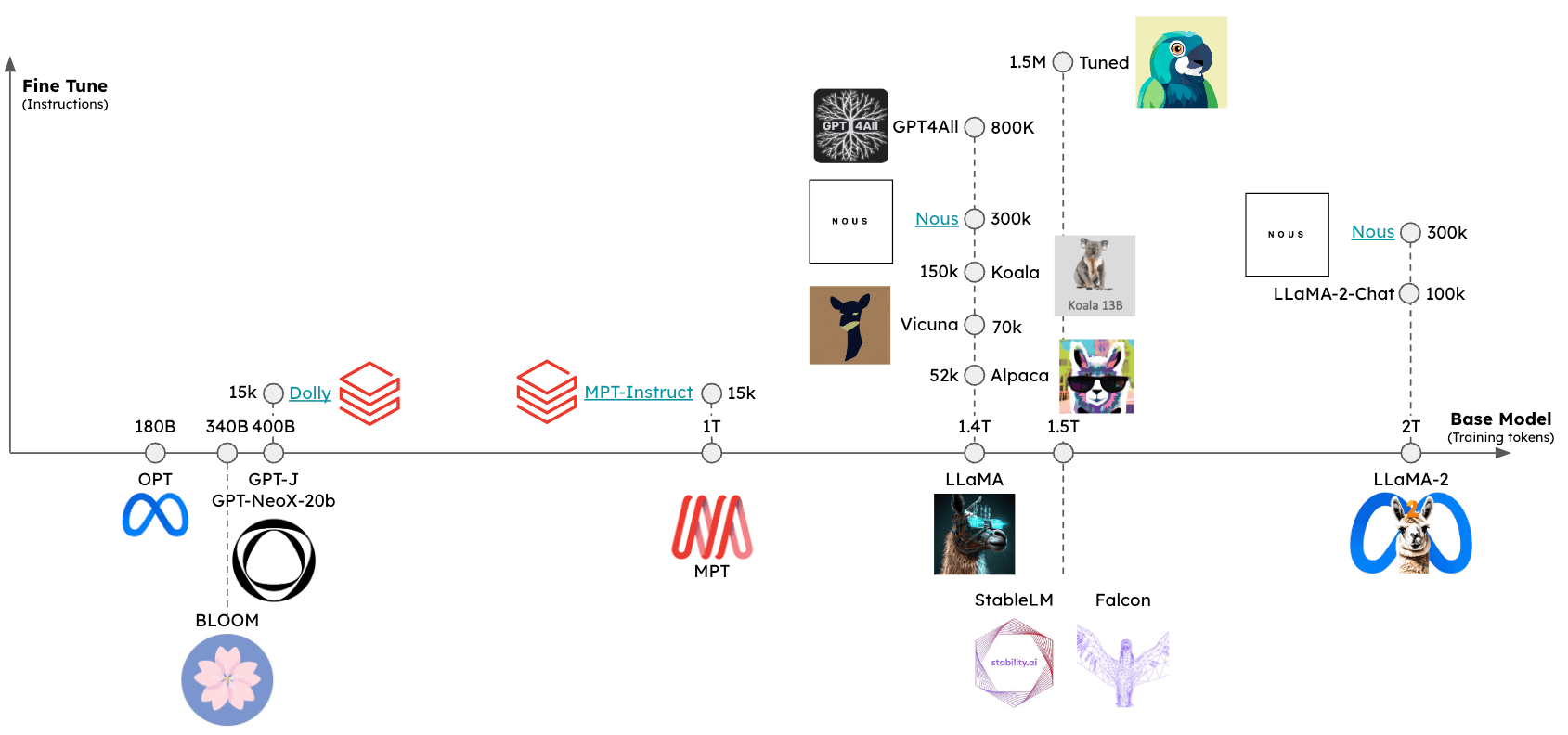
可以使用几个排行榜来评估这些模型的相对性能,包括:
推理
已经出现了一些框架来支持在各种设备上对开源 LLM 进行推理:
llama.cpp:llama 推理代码的 C++ 实现,具有 权重优化/量化gpt4all:用于推理的优化 C 后端Ollama:将模型权重和环境捆绑到一个在设备上运行并服务 LLM 的应用程序中llamafile:将模型权重和运行模型所需的一切捆绑在一个文件中,让您可以直接从该文件在本地运行 LLM,无需任何额外的安装步骤。
总的来说,这些框架会做几件事:
量化:减小原始模型权重的内存占用。高效的推理实现:支持在消费级硬件(例如 CPU 或笔记本电脑 GPU)上进行推理。
特别是,请参阅这篇关于量化重要性的 精彩博文。
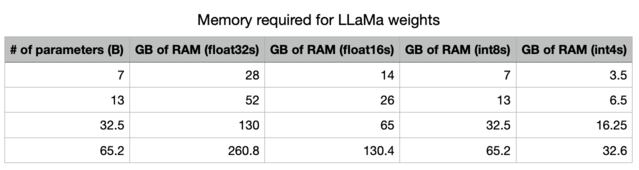
通过降低精度,我们极大地减少了在内存中存储 LLM 所需的内存。
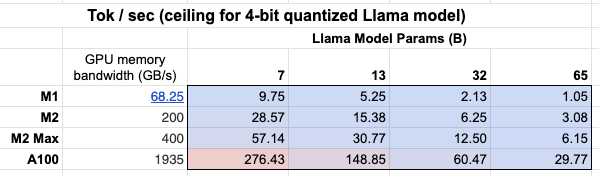
此外,我们还可以看到 GPU 内存带宽 重要性列表!
Mac M2 Max 的推理速度比 M1 快 5-6 倍,因为其 GPU 内存带宽更大。
格式化提示
一些提供商拥有 聊天模型 包装器,可以负责格式化您的输入提示,以适应您正在使用的特定本地模型。但是,如果您使用 文本输入/文本输出 LLM 包装器来提示本地模型,您可能需要使用针对特定模型量身定制的提示。
快速入门
Ollama 是在 macOS 上轻松进行推理的一种方式。
此处 的说明提供了详细信息,我们在此总结一下:
- 下载并运行 该应用程序
- 从命令行,从这个 选项列表 中获取模型:例如
ollama pull llama3.1:8b - 当应用程序运行时,所有模型都会自动在
localhost:11434上提供服务。
%pip install -qU langchain_ollama
from langchain_ollama import OllamaLLM

llm = OllamaLLM(model="llama3.1:8b")

llm.invoke("The first man on the moon was ...")
'...Neil Armstrong!\n\nOn July 20, 1969, Neil Armstrong became the first person to set foot on the lunar surface, famously declaring "That\'s one small step for man, one giant leap for mankind" as he stepped off the lunar module Eagle onto the Moon\'s surface.\n\nWould you like to know more about the Apollo 11 mission or Neil Armstrong\'s achievements?'
在生成时流式传输 token:
for chunk in llm.stream("The first man on the moon was ..."):
    print(chunk, end="|", flush=True)
...|
``````output
Neil| Armstrong|,| an| American| astronaut|.| He| stepped| out| of| the| lunar| module| Eagle| and| onto| the| surface| of| the| Moon| on| July| |20|,| |196|9|,| famously| declaring|:| "|That|'s| one| small| step| for| man|,| one| giant| leap| for| mankind|."||
Ollama 还包含一个聊天模型包装器,用于处理对话轮次格式化:
from langchain_ollama import ChatOllama

chat_model = ChatOllama(model="llama3.1:8b")

chat_model.invoke("Who was the first man on the moon?")
AIMessage(content='The answer is a historic one!\n\nThe first man to walk on the Moon was Neil Armstrong, an American astronaut and commander of the Apollo 11 mission. On July 20, 1969, Armstrong stepped out of the lunar module Eagle onto the surface of the Moon, famously declaring:\n\n"That\'s one small step for man, one giant leap for mankind."\n\nArmstrong was followed by fellow astronaut Edwin "Buzz" Aldrin, who also walked on the Moon during the mission. Michael Collins remained in orbit around the Moon in the command module Columbia.\n\nNeil Armstrong passed away on August 25, 2012, but his legacy as a pioneering astronaut and engineer continues to inspire people around the world!', response_metadata={'model': 'llama3.1:8b', 'created_at': '2024-08-01T00:38:29.176717Z', 'message': {'role': 'assistant', 'content': ''}, 'done_reason': 'stop', 'done': True, 'total_duration': 10681861417, 'load_duration': 34270292, 'prompt_eval_count': 19, 'prompt_eval_duration': 6209448000, 'eval_count': 141, 'eval_duration': 4432022000}, id='run-7bed57c5-7f54-4092-912c-ae49073dcd48-0', usage_metadata={'input_tokens': 19, 'output_tokens': 141, 'total_tokens': 160})
环境
本地运行模型时,推理速度是一个挑战(如上所述)。
为了最小化延迟,最好在本地的 GPU 上运行模型,许多消费级笔记本电脑都配备 GPU 例如,Apple 设备)。
即使有 GPU,可用的 GPU 显存带宽(如上所述)也很重要。
运行 Apple silicon GPU
Ollama 和 llamafile 将自动利用 Apple 设备上的 GPU。
其他框架需要用户设置环境以利用 Apple GPU。
例如,llama.cpp 的 Python 绑定可以通过 Metal 进行配置以使用 GPU。
Metal 是 Apple 创建的图形和计算 API,提供对 GPU 的近乎直接的访问。
请在此处参阅 llama.cpp 的设置 here 以启用此功能。
特别是,请确保 conda 使用您创建的正确虚拟环境(miniforge3)。
例如,对我来说:
conda activate /Users/rlm/miniforge3/envs/llama
在确认上述信息后:
CMAKE_ARGS="-DLLAMA_METAL=on" FORCE_CMAKE=1 pip install -U llama-cpp-python --no-cache-dir
LLMs
有多种方式可以访问量化模型权重。
HuggingFace- 许多量化模型都可供下载,并可以使用框架运行,例如llama.cpp。您也可以从 HuggingFace 下载llamafile格式的模型。gpt4all- 该模型浏览器提供了指标排行榜以及可供下载的相应量化模型。Ollama- 可以通过pull直接访问几个模型。
Ollama
使用 Ollama,通过 ollama pull <model family>:<tag> 获取模型:
- 例如,对于 Llama 2 7b:
ollama pull llama2将下载该模型的最基础版本(例如,参数数量最少且为 4 位量化)。 - 我们也可以从模型列表指定特定版本,例如
ollama pull llama2:13b。 - 请参阅API 参考页面上的完整参数集。
llm = OllamaLLM(model="llama2:13b")
llm.invoke("The first man on the moon was ... think step by step")
' Sure! Here\'s the answer, broken down step by step:\n\nThe first man on the moon was... Neil Armstrong.\n\nHere\'s how I arrived at that answer:\n\n1. The first manned mission to land on the moon was Apollo 11.\n2. The mission included three astronauts: Neil Armstrong, Edwin "Buzz" Aldrin, and Michael Collins.\n3. Neil Armstrong was the mission commander and the first person to set foot on the moon.\n4. On July 20, 1969, Armstrong stepped out of the lunar module Eagle and onto the moon\'s surface, famously declaring "That\'s one small step for man, one giant leap for mankind."\n\nSo, the first man on the moon was Neil Armstrong!'
Llama.cpp
Llama.cpp 与广泛的模型兼容。
例如,我们使用从 HuggingFace 下载的 4 位量化的 llama2-13b 模型进行推理。
如上所述,请参阅 API 参考以获取所有参数的完整列表。
从 llama.cpp API 参考文档 中,有几个参数值得说明:
n_gpu_layers: 要加载到 GPU 内存中的层数
- 值:1
- 含义:模型只会有一层被加载到 GPU 内存中(通常 1 层就足够了)。
n_batch: 模型应并行处理的 token 数量
- 值:n_batch
- 含义:建议选择一个介于 1 和 n_ctx(在此情况下设置为 2048)之间的值。
n_ctx: Token 上下文窗口
- 值:2048
- 含义:模型一次将考虑 2048 个 token 的窗口。
f16_kv: 模型是否应为 key/value 缓存使用半精度
- 值:True
- 含义:模型将使用半精度,这可能更节省内存;Metal 只支持
True。
%env CMAKE_ARGS="-DLLAMA_METAL=on"
%env FORCE_CMAKE=1
%pip install --upgrade --quiet  llama-cpp-python --no-cache-dir
from langchain_community.llms import LlamaCpp
from langchain_core.callbacks import CallbackManager, StreamingStdOutCallbackHandler

llm = LlamaCpp(
    model_path="/Users/rlm/Desktop/Code/llama.cpp/models/openorca-platypus2-13b.gguf.q4_0.bin",
    n_gpu_layers=1,
    n_batch=512,
    n_ctx=2048,
    f16_kv=True,
    callback_manager=CallbackManager([StreamingStdOutCallbackHandler()]),
    verbose=True,
)
控制台日志将显示以下内容,以表明 Metal 已从以上步骤中成功启用:
ggml_metal_init: allocating
ggml_metal_init: using MPS
llm.invoke("The first man on the moon was ... Let's think step by step")
Llama.generate: prefix-match hit
``````output
 and use logical reasoning to figure out who the first man on the moon was.

Here are some clues:

1. The first man on the moon was an American.
2. He was part of the Apollo 11 mission.
3. He stepped out of the lunar module and became the first person to set foot on the moon's surface.
4. His last name is Armstrong.

Now, let's use our reasoning skills to figure out who the first man on the moon was. Based on clue #1, we know that the first man on the moon was an American. Clue #2 tells us that he was part of the Apollo 11 mission. Clue #3 reveals that he was the first person to set foot on the moon's surface. And finally, clue #4 gives us his last name: Armstrong.
Therefore, the first man on the moon was Neil Armstrong!
``````output

llama_print_timings:        load time =  9623.21 ms
llama_print_timings:      sample time =   143.77 ms /   203 runs   (    0.71 ms per token,  1412.01 tokens per second)
llama_print_timings: prompt eval time =   485.94 ms /     7 tokens (   69.42 ms per token,    14.40 tokens per second)
llama_print_timings:        eval time =  6385.16 ms /   202 runs   (   31.61 ms per token,    31.64 tokens per second)
llama_print_timings:       total time =  7279.28 ms
" and use logical reasoning to figure out who the first man on the moon was.\n\nHere are some clues:\n\n1. The first man on the moon was an American.\n2. He was part of the Apollo 11 mission.\n3. He stepped out of the lunar module and became the first person to set foot on the moon's surface.\n4. His last name is Armstrong.\n\nNow, let's use our reasoning skills to figure out who the first man on the moon was. Based on clue #1, we know that the first man on the moon was an American. Clue #2 tells us that he was part of the Apollo 11 mission. Clue #3 reveals that he was the first person to set foot on the moon's surface. And finally, clue #4 gives us his last name: Armstrong.\nTherefore, the first man on the moon was Neil Armstrong!"
GPT4All
我们可以使用从 GPT4All 模型浏览器下载的模型权重。
与上方所示类似,我们可以进行推理,并使用 API 参考 来设置感兴趣的参数。
%pip install gpt4all
from langchain_community.llms import GPT4All

llm = GPT4All(
    model="/Users/rlm/Desktop/Code/gpt4all/models/nous-hermes-13b.ggmlv3.q4_0.bin"
)
llm.invoke("The first man on the moon was ... Let's think step by step")
".\n1) The United States decides to send a manned mission to the moon.2) They choose their best astronauts and train them for this specific mission.3) They build a spacecraft that can take humans to the moon, called the Lunar Module (LM).4) They also create a larger spacecraft, called the Saturn V rocket, which will launch both the LM and the Command Service Module (CSM), which will carry the astronauts into orbit.5) The mission is planned down to the smallest detail: from the trajectory of the rockets to the exact movements of the astronauts during their moon landing.6) On July 16, 1969, the Saturn V rocket launches from Kennedy Space Center in Florida, carrying the Apollo 11 mission crew into space.7) After one and a half orbits around the Earth, the LM separates from the CSM and begins its descent to the moon's surface.8) On July 20, 1969, at 2:56 pm EDT (GMT-4), Neil Armstrong becomes the first man on the moon. He speaks these"
llamafile
运行本地 LLM 的最简单方法之一是使用 llamafile。您只需要:
- 从 HuggingFace 下载一个 llamafile。
- 使文件可执行。
- 运行该文件。
llamafiles 将模型权重和 llama.cpp 的 特殊编译版本 打包到一个文件中,该文件可以在大多数计算机上运行,无需任何额外依赖。它们还带有一个嵌入式推理服务器,提供用于与模型交互的 API。
下面是一个简单的 bash 脚本,展示了所有 3 个设置步骤:
# 从 HuggingFace 下载 llamafile
wget https://huggingface.co/jartine/TinyLlama-1.1B-Chat-v1.0-GGUF/resolve/main/TinyLlama-1.1B-Chat-v1.0.Q5_K_M.llamafile

# 使文件可执行。在 Windows 上,只需将文件名重命名为以 ".exe" 结尾即可。
chmod +x TinyLlama-1.1B-Chat-v1.0.Q5_K_M.llamafile

# 启动模型服务器。默认监听 http://localhost:8080。
./TinyLlama-1.1B-Chat-v1.0.Q5_K_M.llamafile --server --nobrowser
在执行完上述设置步骤后,您就可以使用 LangChain 与您的模型进行交互了:
from langchain_community.llms.llamafile import Llamafile

llm = Llamafile()

llm.invoke("The first man on the moon was ... Let's think step by step.")
"\nFirstly, let's imagine the scene where Neil Armstrong stepped onto the moon. This happened in 1969. The first man on the moon was Neil Armstrong. We already know that.\n2nd, let's take a step back. Neil Armstrong didn't have any special powers. He had to land his spacecraft safely on the moon without injuring anyone or causing any damage. If he failed to do this, he would have been killed along with all those people who were on board the spacecraft.\n3rd, let's imagine that Neil Armstrong successfully landed his spacecraft on the moon and made it back to Earth safely. The next step was for him to be hailed as a hero by his people back home. It took years before Neil Armstrong became an American hero.\n4th, let's take another step back. Let's imagine that Neil Armstrong wasn't hailed as a hero, and instead, he was just forgotten. This happened in the 1970s. Neil Armstrong wasn't recognized for his remarkable achievement on the moon until after he died.\n5th, let's take another step back. Let's imagine that Neil Armstrong didn't die in the 1970s and instead, lived to be a hundred years old. This happened in 2036. In the year 2036, Neil Armstrong would have been a centenarian.\nNow, let's think about the present. Neil Armstrong is still alive. He turned 95 years old on July 20th, 2018. If he were to die now, his achievement of becoming the first human being to set foot on the moon would remain an unforgettable moment in history.\nI hope this helps you understand the significance and importance of Neil Armstrong's achievement on the moon!"
提示词
某些大型语言模型(LLM)需要特定的提示词。
例如,LLaMA 会使用 特殊标记。
我们可以使用 ConditionalPromptSelector 根据模型类型来设置提示词。
# Set our LLM
llm = LlamaCpp(
    model_path="/Users/rlm/Desktop/Code/llama.cpp/models/openorca-platypus2-13b.gguf.q4_0.bin",
    n_gpu_layers=1,
    n_batch=512,
    n_ctx=2048,
    f16_kv=True,
    callback_manager=CallbackManager([StreamingStdOutCallbackHandler()]),
    verbose=True,
)
为模型版本设置关联的提示。
from langchain.chains.prompt_selector import ConditionalPromptSelector
from langchain_core.prompts import PromptTemplate

DEFAULT_LLAMA_SEARCH_PROMPT = PromptTemplate(
    input_variables=["question"],
    template="""<<SYS>> \n You are an assistant tasked with improving Google search \
results. \n <</SYS>> \n\n [INST] Generate THREE Google search queries that \
are similar to this question. The output should be a numbered list of questions \
and each should have a question mark at the end: \n\n {question} [/INST]""",
)

DEFAULT_SEARCH_PROMPT = PromptTemplate(
    input_variables=["question"],
    template="""You are an assistant tasked with improving Google search \
results. Generate THREE Google search queries that are similar to \
this question. The output should be a numbered list of questions and each \
should have a question mark at the end: {question}""",
)

QUESTION_PROMPT_SELECTOR = ConditionalPromptSelector(
    default_prompt=DEFAULT_SEARCH_PROMPT,
    conditionals=[(lambda llm: isinstance(llm, LlamaCpp), DEFAULT_LLAMA_SEARCH_PROMPT)],
)

prompt = QUESTION_PROMPT_SELECTOR.get_prompt(llm)
prompt
PromptTemplate(input_variables=['question'], output_parser=None, partial_variables={}, template='<<SYS>> \n You are an assistant tasked with improving Google search results. \n <</SYS>> \n\n [INST] Generate THREE Google search queries that are similar to this question. The output should be a numbered list of questions and each should have a question mark at the end: \n\n {question} [/INST]', template_format='f-string', validate_template=True)
# Chain
chain = prompt | llm
question = "What NFL team won the Super Bowl in the year that Justin Bieber was born?"
chain.invoke({"question": question})
  Sure! Here are three similar search queries with a question mark at the end:

1. Which NBA team did LeBron James lead to a championship in the year he was drafted?
2. Who won the Grammy Awards for Best New Artist and Best Female Pop Vocal Performance in the same year that Lady Gaga was born?
3. What MLB team did Babe Ruth play for when he hit 60 home runs in a single season?
``````output

llama_print_timings:        load time = 14943.19 ms
llama_print_timings:      sample time =    72.93 ms /   101 runs   (    0.72 ms per token,  1384.87 tokens per second)
llama_print_timings: prompt eval time = 14942.95 ms /    93 tokens (  160.68 ms per token,     6.22 tokens per second)
llama_print_timings:        eval time =  3430.85 ms /   100 runs   (   34.31 ms per token,    29.15 tokens per second)
llama_print_timings:       total time = 18578.26 ms
' Sure! Here are three similar search queries with a question mark at the end:\n\n1. Which NBA team did LeBron James lead to a championship in the year he was drafted?\n2. Who won the Grammy Awards for Best New Artist and Best Female Pop Vocal Performance in the same year that Lady Gaga was born?\n3. What MLB team did Babe Ruth play for when he hit 60 home runs in a single season?'
我们也可以使用 LangChain Prompt Hub 来获取和/或存储特定于模型的提示。
这将与您的 LangSmith API 密钥 一起使用。
例如,这里 是一个带有特定于 LLaMA 的令牌 (tokens) 的 RAG 提示。
使用场景
使用上述模型创建的 llm,您可以将其用于多种使用场景。
例如,您可以使用此处演示的聊天模型来实现RAG 应用。
总的来说,本地 LLM 的使用场景至少受以下两个因素驱动:
隐私:用户不想共享的私人数据(例如日记等)成本:文本预处理(提取/标记)、摘要和代理模拟是大量使用 token 的任务
此外,此处 提供了关于微调的概述,该过程可以利用开源 LLM。